Free methods and bonuses with requirements
Here, a free method means receiving an item without a mandatory payment or giving up your own skins. Prime is a paid CS2 account status required to receive weekly rewards. Once you buy it, there is no separate charge for each new Weekly Care Package.
| Method | What you can get | Payment and conditions |
|---|---|---|
| CS2 Weekly Care Package | A skin, graffiti, case or terminal on Steam | No new payment. Requires Prime and your first profile level-up of the week. |
| Task rewards | Points to redeem for an available skin | Depends on the programme. Check whether claiming and withdrawing the item is possible without a purchase or deposit. |
| Free giveaway | A prize if you are selected as a winner | A chance to win. Entry must not require a payment. |
| Gift from another player | An item through a Steam trade | No payment. Receiving a gift does not require giving up your own items. |
| DatDrop Welcome case | A Welcome bonus item | Bonus with requirements. Removing restrictions requires an eligible deposit and the specified total in qualifying stakes. |
| DatDrop daily Free Cases | A reward from an available free case | Bonus linked to paid play. Opening costs no balance; access depends on stakes in paid games. |
| Server skinchanger | A chosen weapon appearance on a server | Appearance only. No item is added to your Steam inventory. |
Points still need to be redeemed for an available item, and a bonus may have withdrawal restrictions. A skin received on Steam appears in your inventory; check its description for selling and trading restrictions.
How to get skins from the Weekly Care Package
The Weekly Care Package is available to Prime players. It is awarded for your first profile level-up of the game week. Non-Prime accounts do not receive weekly rewards.
To claim your rewards:
- Play modes that award XP.You need XP from official servers. A higher Premier rating or a new Competitive Skill Group does not replace a profile level-up.
- Open the care package after levelling up.The game offers four rewards, and you can claim two.
- Compare the options and confirm.The items will appear in your inventory. You can use a skin in-game; assess a case or terminal separately from its contents.
The number of matches needed depends on your remaining XP and how much you earn while playing.
When can you get the next package?
The weekly limit refreshes at the shared weekly reset. Check the remaining time on the Weekly Care Package redemption screen in CS2. After the reset, level up your profile again; waiting alone does not unlock a package.
What can drop in 2026?
The package can offer weapon skins, graffiti and containers. Skin collections include Ascent, Boreal, Radiant, Harlequin and Achroma. Valve added the last two in January 2026.
The table shows five Classified skins. These collections also contain skins of other rarities.
| Collection | Example skin |
|---|---|
| Ascent | 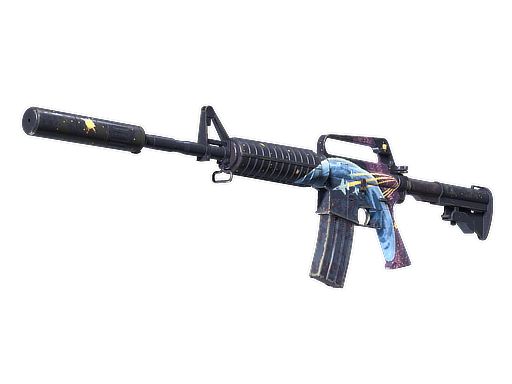 M4A1-S · Stratosphere M4A1-S · Stratosphere |
| Boreal | 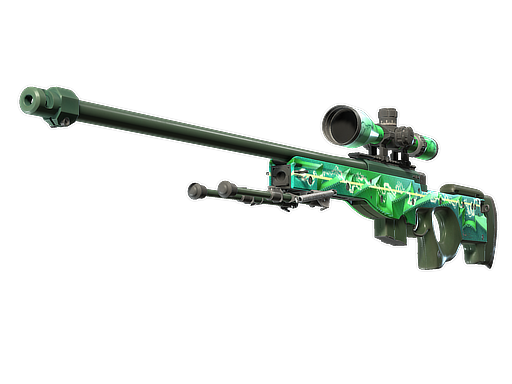 AWP · Green Energy AWP · Green Energy |
| Radiant | 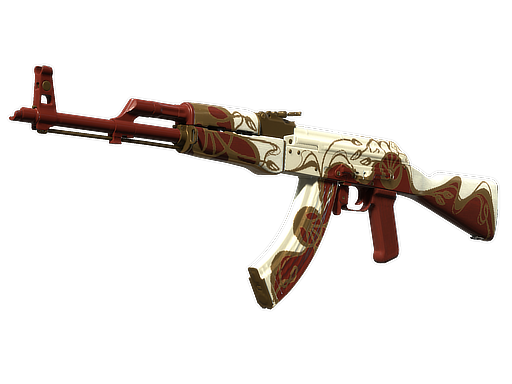 AK-47 · Nouveau Rouge AK-47 · Nouveau Rouge |
| Harlequin | 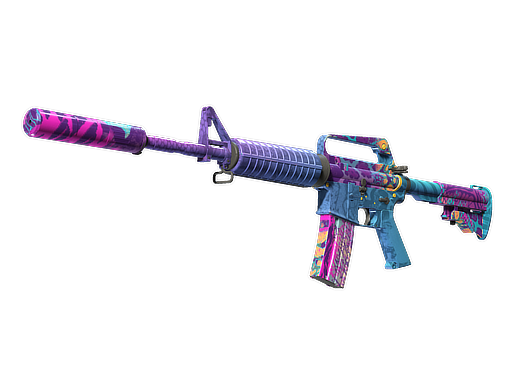 M4A1-S · Party Animal M4A1-S · Party Animal |
| Achroma | 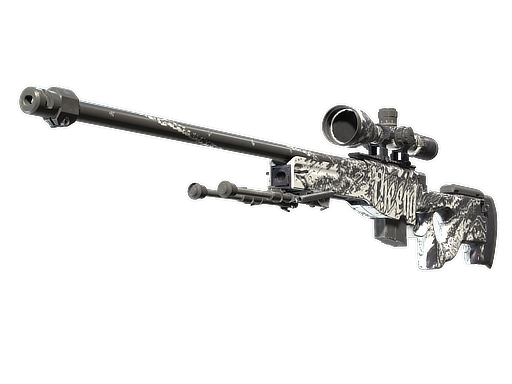 AWP · The End AWP · The End |
The package offers random items; you cannot choose a specific skin in advance.
Weekly containers include the Kilowatt Case, Revolution Case, Dreams & Nightmares Case, Sealed Genesis Terminal and Sealed Dead Hand Terminal. Updates can change the list.
A skin from a container may require a separate payment. A normal weapon case needs a paid key. With a terminal, you pay for the item offer you choose to purchase.
Which rewards should you choose?
For a skin to play with, choose a finish you like. If you are saving for another item, compare the offered rewards’ current prices on the Steam Community Market.
A rarer item is not necessarily more expensive. When selling, compare your proceeds after fees. If the difference is small, you can keep a skin you will actually use.
What if the package does not appear?
Check three things:
- Your account has Prime.
- The match awarded XP and your profile level actually increased.
- You have not already claimed this week’s package.
Playing on a server without earning XP does not bring the weekly reward closer.
Turn an unwanted drop into a skin you choose
You do not have to keep or open the item you receive. If it can be sold, the proceeds can go towards a skin you want.
- Open the item in your Steam inventory and check whether it is marketable.
- Before listing it, check your proceeds after fees.
- After it sells, compare your Wallet balance with the chosen skin’s price.
If the balance covers the price, you do not need to add funds. Otherwise, you can keep it until another drop. Sale proceeds stay in your Steam Wallet and cannot be withdrawn to a bank account.
How to get skins without Prime
Without Prime, you cannot receive weekly drops. Other options are gifts, free giveaways and reward programmes that let you claim an item without payment.
Rewards for gameplay tasks
Before starting a task, find the skin you want in the rewards catalogue. Check its availability, points cost and Steam delivery requirements: withdrawal minimums, fees and any mandatory purchase or deposit.
Then check which actions count and when points are credited. If claiming the reward requires payment, include that cost before you start.
Gifts, free giveaways and tournaments
Check the giveaway announcement for the prize, entry deadline, winner selection and item delivery. For a tournament, also check the format, team size, schedule and prize distribution. Free entry gives you a chance to win, not a guaranteed reward.
Receive a gift or prize skin through a Steam trade offer. Verify the sender and item; the list of items you give must be empty.
DatDrop’s Welcome case and free cases
The Welcome case for new users
DatDrop offers a Welcome case to new users. Its item becomes a Welcome bonus. You cannot immediately sell it, use it in Upgrade or withdraw it.
Removing the restrictions requires a deposit that meets the bonus rules, followed by the specified wagering total in DatDrop games. Wagering means the total of qualifying stakes, not the deposit amount.
Your current requirement and progress appear when you try to take an action with the bonus item. The bonus is optional and can be declined.
Daily Free Cases
Free Cases is a separate programme. Access depends on your current level and account requirements, including following DatDrop on X.
Your level depends on the total stakes counted by the programme. Depositing alone does not raise it. Progress decreases at the daily reset, so your available openings can change.
Check your level and available cases on the Free Cases page. Opening an available free case does not deduct funds from your balance.
Can you get a free knife in CS2?
A knife cannot drop directly from the Weekly Care Package. A normal weapon case received as a drop needs a paid key to open and does not guarantee a knife.
You could receive a knife without payment as a gift or a prize in a free giveaway. Entry alone does not guarantee one. Trading your skins or using a trade-up contract consumes items you already own, so account for their value.
How to receive a reward safely
- Open the organiser’s site yourself.Do not sign into Steam through a link in an unexpected prize message. Check the address even if the message came from a friend.
- Keep your sign-in details private.Sending you a skin does not require your password, Steam Guard codes or approval of someone else’s sign-in. Do not install unknown programmes or extensions for a prize.
- Check both sides of the trade.The promised skin should be among the items you receive. A request to send your own skin for “verification” is a reason to stop.
After accepting the offer, find the item in your own Steam inventory. If you cannot sell or trade it yet, read the restriction in its description.
Get to know DatDrop
Explore the platform, understand Case Battles and check the deposit steps before choosing a mode.