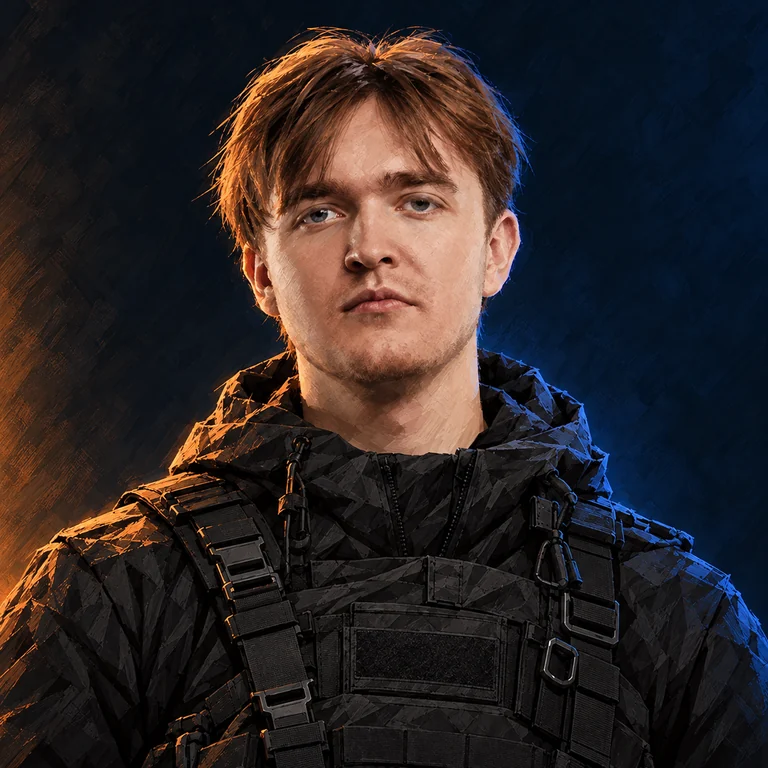
About the player
Vladislav Gorshkov, known as nafany, is a Counter-Strike player.
- Full name
- Vladislav Gorshkov
- Born
- 15.06.2001
- Country
- Russia
- Team
- 1win
- Role
- IGL, Entry
- Roster status
- Main roster as reported
- Career status
- Active as reported
Quick answers
- CS2 teams
- 1win
- Role
- IGL, Entry
- CS2
- Active
- Age
- 25 years
Saved in this browser, without an account.
What is nafany’s real name?
Vladislav Gorshkov
What sensitivity does nafany use?
DPI: 800 · sens: 1 · eDPI: 800.00
Which mouse does nafany use?
Razer Viper V3 Pro White
What resolution does nafany play on?
1280x960
Team history
| From | To | Team / status |
|---|---|---|
| 2018-05-18 | 2018-06-18 | FLuffy Gangsters |
| Sep 2018 | Dec 2018 | Vyalie Pitoni |
| 2019-04-05 | 2020-10-05 | Gambit Youngsters |
| 2020-10-05 | 2022-04-24 | Gambit Esports |
| 2022-04-24 | 2023-07-14 | Cloud9 |
| 2023-07-14 | 2023-07-31 | Cloud9(Inactive) |
| 2023-07-31 | 2024-11-26 | BetBoom Team |
| 2024-11-26 | 2025-08-09 | BB(Inactive) |
| 2025-08-09 | 2025-12-01 | AMKAL ESPORTS |
| 2025-12-01 | 2026-05-06 | AKL(Inactive) |
| 2026-01-17 | 2026-08-01 | TDK |
| 2026-08-01 | Present | 1w Team |
Selected tournament results
| Date | Event | Place | Team / status |
|---|---|---|---|
| 2023-05-03 | Brazy Party | 1st | C9 |
| 2023-04-04 | BetBoom Playlist. Urbanistic | 1st | C9 |
Statistics
- Period
- Past 3 months
- Rating 3.0
- 0.96
- Maps in the sample
- 90
- Firepower
- 52/100
- Space creation
- 55/100
- Trading
- 27/100
- Opening duels
- 81/100
- Sniping
- 4/100
- Utility
- 40/100
Reading this setup
Sensitivity: 1 at 800 DPI (800.00 eDPI). Resolution: 1280x960. Save your current values before testing changes.
Why compare eDPI?Skins & inventory
Steam did not provide access to this inventory. This does not mean it is empty.
This sensitivity on your DPI
Equivalent sensitivity = player DPI × player sensitivity ÷ your DPI. Zoom sensitivity is separate.
Try this crosshair
Illustrative preview from the listed values. In-game rendering depends on resolution and scaling.
Published settings .cfg
Included settings: mouse sensitivity, viewmodel. Set DPI, device and display settings separately. The pixel measurements shown in the profile are not exported as console commands.
Save your own configuration first. Paste the commands into the developer console, or put the .cfg in your CS2 cfg folder and run exec with its filename.
Copy commands
Mouse
- DPI
- 800
- Sensitivity
- 1
- eDPI
- 800.00
- Zoom sensitivity
- 1
- Polling rate, Hz
- 1000
- Windows sensitivity
- 6
Crosshair
- Style
- Static Cross
- Follow recoil
- No
- Center dot
- No
- Length (px)
- 2
- Thickness (px)
- 2
- Gap (px)
- 1
- Outline
- No
- Outline red
- 0
- Outline green
- 0
- Outline blue
- 0
- Outline opacity
- 255
- Red
- 0
- Green
- 255
- Blue
- 186
- Opacity
- 255
- T-shaped crosshair
- No
- Split distance
- 6
- Inner split opacity
- 1
- Outer split opacity
- 0.5
- Split size ratio
- 0.3
- Sniper crosshair width
- 0
- Spread limit
- 227
- Screen height
- 960
- Use crosshair color for scope dot
- No
- Scope dot scale
- 1
Viewmodel
- Field of view (FOV)
- 68
- X offset
- 2.5
- Y offset
- 0
- Z offset
- -1.5
- Weapon bob
- No
Video
- Resolution
- 1280x960
- Aspect ratio
- 4:3
- Scaling mode
- Stretched
- Brightness
- 91%
- Display mode
- Fullscreen
- Boost player contrast
- Enabled
- V-Sync
- Disabled
- NVIDIA Reflex low latency
- Enabled
- NVIDIA G-Sync
- Disabled
- Maximum FPS in game
- 0
- Multisampling anti-aliasing (MSAA)
- 4x MSAA
- Global shadow quality
- Very High
- Dynamic shadows
- All
- Model / texture detail
- Low
- Texture filtering
- Bilinear
- Shader detail
- Low
- Particle detail
- Low
- Ambient occlusion
- Disabled
- High dynamic range (HDR)
- Quality
- FidelityFX Super Resolution
- Disabled (highest quality)
HUD
- HUD scale
- 1
- HUD color
- White
Radar
- Center radar on player
- Yes
- Rotate radar
- Yes
- Change radar shape with scoreboard
- Yes
- Radar HUD size
- 1.122728
- Radar map zoom
- 0.5
Equipment
- Monitor
- ZOWIE XL2566K
- Mouse
- Razer Viper V3 Pro White
- Keyboard
- Wooting 80HE Black
- Headset
- HyperX Cloud II
- Mousepad
- SteelSeries QcK Heavy Black
- Earphones
- Razer Moray Green (Unreleased)
- Processor
- Intel Core i7-13700K
- Graphics card
- NVIDIA GeForce RTX 4070
- Liquid Cooling
- NZXT Kraken X63
- RAM
- HyperX Fury 16GB
- Motherboard
- ASUS ROG STRIX Z790-E Gaming WiFi
Monitor settings
- Black eQualizer
- 10
- Color vibrance
- 10
- Low blue light
- 0
- Picture mode
- Standard
- Brightness
- 100
- Contrast
- 50
- Sharpness
- 10
- Gamma
- Gamma 3
- Color temperature
- Bluish
- AMA
- High
- DyAc
- Premium
Graphics card settings
- Digital vibrance
- 50%