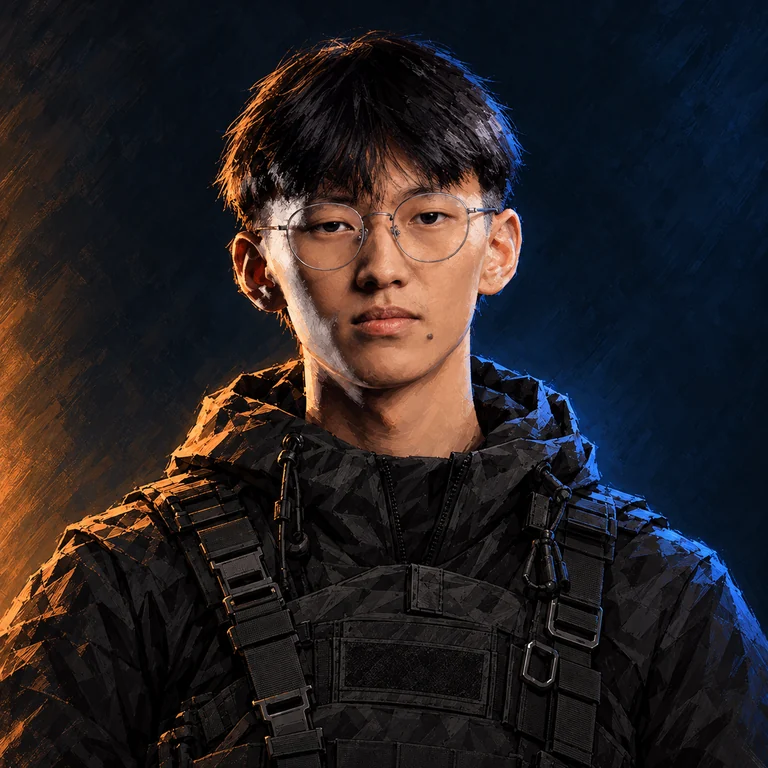
About the player
Ariunjargal Yadam, known as ariucle, is a Counter-Strike player.
- Full name
- Ariunjargal Yadam
- Born
- 29.09.2004
- Country
- Mongolia
- Team
- 5star
- Role
- Rifler
- Roster status
- Main roster as reported
- Career status
- Professional activity as reported
Quick answers
- CS2 teams
- 5star
- Role
- Rifler
- CS2
- Active
- Age
- 22 years
Saved in this browser, without an account.
What is ariucle’s real name?
Ariunjargal Yadam
What sensitivity does ariucle use?
DPI: 400 · sens: 2.2 · eDPI: 880
Team history
| From | To | Team / status |
|---|---|---|
| 2021-09-08 | 2022-04-24 | Aravt |
| 2022-10-16 | 2023-04-03 | Team Renewal |
| 2023-06-17 | 2023-12-30 | Eruption |
| 2023-12-30 | 2024-03-05 | Myth Avenue Gaming |
| 2024-03-05 | 2024-04-01 | MAG(Inactive) |
| 2024-04-08 | 2024-10-24 | IHC Esports |
| 2024-10-24 | 2025-10-23 | Chinggis Warriors |
| 2025-10-23 | Dec 2025 | CW(Inactive) |
| Feb 2026 | Feb 2026 | Nomads |
| Feb 2026 | Present | 5star eSports |
Selected tournament results
| Date | Event | Place | Team / status |
|---|---|---|---|
| 2026-09-10 | FISSURE Playground #3 | 7th - 8th | 5star |
| 2026-05-14 | Asian Champions League 2026 | 5th - 6th | 5star |
| 2026-03-20 | ESN National Championship 2026 | 1st | 5star |
Statistics
- Period
- Past 3 months
- Rating 3.0
- 0.92
- Maps in the sample
- 71
- Firepower
- 12/100
- Space creation
- 35/100
- Trading
- 62/100
- Opening duels
- 19/100
- Clutching
- 83/100
- Sniping
- 0/100
- Utility
- 56/100
- Career prize money
- $17,735
Reading this setup
Sensitivity: 2.2 at 400 DPI (880 eDPI). At 800 DPI, the equivalent sensitivity is 1.1. Resolution: Not reported. Save your current values before testing changes.
Why compare eDPI?Skins & inventory
Knives, gloves, weapon skins and other items recorded in ariucle’s Steam inventory.
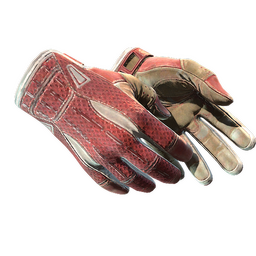
★ Sport Gloves | Slingshot (Field-Tested)
Copies: 1
View each item (1)
- Wear
- Field-Tested
- Float
- 0.230780…
- Pattern
- 628
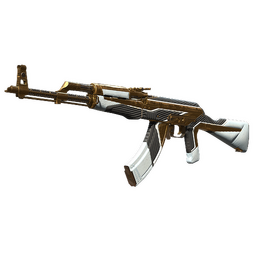
AK-47 | The Oligarch (Field-Tested)
Copies: 1
View each item (1)
- Wear
- Field-Tested
- Float
- 0.323296…
- Pattern
- 999
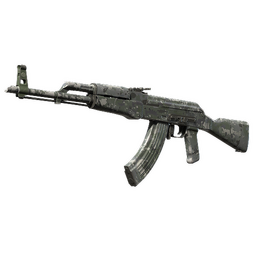
AK-47 | VariCamo Grey (Field-Tested)
Copies: 1
View each item (1)
- Wear
- Field-Tested
- Float
- 0.298255…
- Pattern
- 715
Published crosshair code
CSyCVpokqhkQUhKuNfBciE3NCZJwxvJLxDcSoidmH36xVO
This sensitivity on your DPI
Equivalent sensitivity = player DPI × player sensitivity ÷ your DPI. Zoom sensitivity is separate.
Try this crosshair
Illustrative preview from the listed values. In-game rendering depends on resolution and scaling.
Published settings .cfg
Included settings: mouse sensitivity, crosshair, viewmodel. Set DPI, device and display settings separately.
Save your own configuration first. Paste the commands into the developer console, or put the .cfg in your CS2 cfg folder and run exec with its filename.
Copy commands
Mouse
- DPI
- 400
- Sensitivity
- 2.2
- eDPI
- 880
- Zoom sensitivity
- 0.8
- Polling rate, Hz
- 1000 Hz
- Yaw
- 0.022
Crosshair
- Style
- Static Cross
- Follow recoil
- No
- Center dot
- Off
- Length (px)
- 2
- Thickness (px)
- 2
- Gap (px)
- 1
- Outline
- No
- Outline red
- 0
- Outline green
- 0
- Outline blue
- 0
- Outline opacity
- 255
- Red
- 0
- Green
- 250
- Blue
- 165
- Opacity
- 150
- T-shaped crosshair
- No
- Split distance
- 3
- Inner split opacity
- 0
- Outer split opacity
- 1
- Split size ratio
- 1
- Spread limit
- 227
- Screen height
- 960
- Use crosshair color for scope dot
- No
- Scope dot scale
- 1
- Length (console units)
- 2 px
- Thickness (console units)
- 2 px
- Gap (console units)
- 1 px
- Color
- 0, 250, 165
Viewmodel
- Field of view (FOV)
- 68
- X offset
- 1.5
- Y offset
- 1
- Z offset
- -1
Video
- Scaling mode
- Stretched
- Boost player contrast
- Enabled
HUD
- HUD scale
- 1
- Safezone X
- 1
- Safezone Y
- 1
Radar
- Rotate radar
- true
- Radar HUD size
- 1.1
- Radar map zoom
- 0.35
- Icon Scale Min
- 1