Check withdrawal availability
Read current DatDrop withdrawal rules before depositing. Item availability, account restrictions and available options may change. We do not promise instant withdrawals or every skin being available.
Prepare Steam
- Check trade restrictions and Steam Guard status in your account.
- Find your current Trade URL in Steam’s trade settings.
- Submit your Trade URL only in the verified platform interface.
- Never share your Steam password, backup codes or sign-in confirmations.
Trade URL: what the link means
A Trade URL lets people send Steam trade offers. It is not a password or trade confirmation: you still need to review every offer carefully.
Do not post it in public comments. If unwanted offers arrive, review Steam’s trade-offer settings. Sending someone an offer does not require their password or Steam Guard codes.
Before confirming a trade
Compare the items, recipient and offer details with the action you initiated. Do not accept a trade solely because someone claims to be support.
Stop and check suspicious offers through the official support channel.
Where has the trade stopped?
No Steam offer yet
Check the platform transaction status. A missing offer does not itself mean a Steam trade hold. Keep the transaction ID and any error message for investigation.
The offer exists
Check its Steam status and every item involved. Awaiting confirmation, a transfer hold and an account restriction are different states; read the specific notification.
The item is in your inventory
Delivery is complete. Trade Protected refers to protection after receipt, not a delivery queue.
Account restriction, trade hold or item protection?
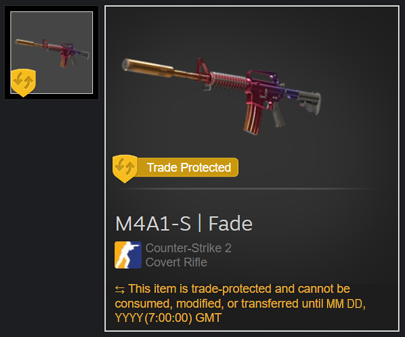
Official Steam help example. The yellow shield and label mark item protection.
- Trade confirmed
The item arrives immediately and can be used in-game.
- Next 7 days
The item cannot be transferred, modified or consumed, including moving it to storage.
- After 7 days
Trade Protected expires. Check other account restrictions separately.
This protects an item already received; it is not a delivery queue.
Original sources
FAQ DatDropScam warningsSteam supportPayment terms and availability may change. We have not tested a deposit or withdrawal.